
Mitel Unified Communications and Devices· Product Details Page
Mitel × Microsoft Teams Integration
Bring enterprise voice to Teams
Mitel
Product Overview
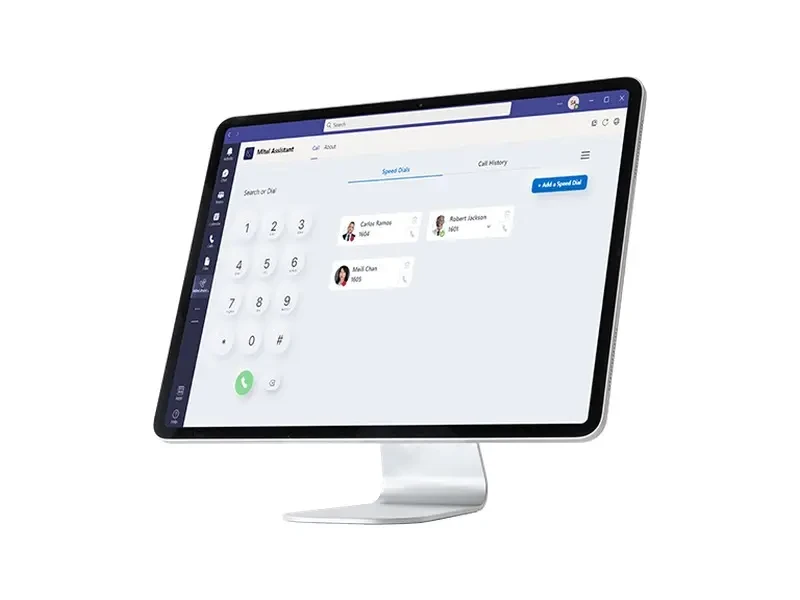
Teams handles collaboration, but enterprise-grade telephony features—such as call routing, recording, operator consoles, and contact center capabilities—often still rely on existing Mitel platforms. This integration enables employees to work entirely within Teams while Mitel ensures call quality and compliance in the background.
Choose the path based on your licensing budget and operational preferences: go with Telephony Only Client to save costs, add Mitel Assistant for unified status visibility, or use SBC direct connectivity to integrate Mitel directly into Teams Calling.
Key Features
- One-click answer, place calls, and view records in Teams
- Sync bidirectional online and call status
- No Microsoft E5 or Phone System license required
Features and Configuration
- Employees can answer calls, dial, and view call history in Teams without switching apps.
- Retain Mitel call routing, hunt groups, and enterprise voice features to avoid purchasing duplicate phone licenses.
- Continue using existing phones, softphones, and call center systems while progressing the migration on schedule.
- Three integration paths address cost-sensitive needs, unified state requirements, and direct routing scenarios respectively.
Technical Specifications (8Item
- Integration Method 1
- Mitel Telephony Only Client: Teams for collaboration interface, Mitel call server provides voice
- Integration Method 2
- Mitel Assistant (Teams Tab App): One-Click Answer, Call History, Make Calls, and Presence
- Integration Method 3
- Direct Routing via Mitel SBC: Connect the Mitel Platform to Teams Phone
- License Requirements
- Mitel Assistant does not require Microsoft E5 or Phone System licenses.
- Online status
- Bidirectional state sync: call status updates with user actions.
- Target Users
- Suitable for both unified communications and call center agents.
- Use Cases
- Enterprises that have widely adopted Teams and wish to retain their existing phone systems and endpoints
- Selection Recommendation
- Ideal for large enterprises fully adopted to Teams while still using Mitel phone systems. Supports hundreds to thousands of seats across multiple sites. Choose Telephony Only Client for budget-conscious needs requiring only call answering and dialing; add Mitel Assistant for unified presence and call records; if you already have an SBC and want Teams to handle all telephony, go with Direct Routing.
Similar Products
- Mitel × Zoom WorkplaceParameters9ItemView
- Mitel MiCollabParameters8ItemView
- OpenScape UCParameters7ItemView
- Mitel Unify PhoneParameters7ItemView
- Mitel 6900 Series IP PhonesParameters9ItemView
- Mitel Open SIP PhoneParameters9ItemView
- Mitel DECT Cordless SolutionParameters8ItemView
- OpenScape DeskPhone CPx10Parameters9ItemView
- Mitel 6970 Conference PhoneParameters8ItemView